.png)
.png)
B2B WAVE INTEGRATIONS
Avalara
As a wholesale business owner in the US, you likely understand the struggle of ever-changing intra-state sales tax regulations. How about different sales tax on the same street but with a different postal code? If so, we recommend using our integration with Avalara. Avalara can automate sales tax calculations by taking into account the customer type, product type, and destination address. Avalara's address validation feature will also ensure that your wholesale orders will be delivered to the right place.





.svg)
Here’s how B2B Wave and
Avalara
work together:
While on the order review page, the order's taxes are calculated. The customer can click on the magnifying glass icon to see a detailed breakdown of the taxes that have been calculated for their order based on their parameters.


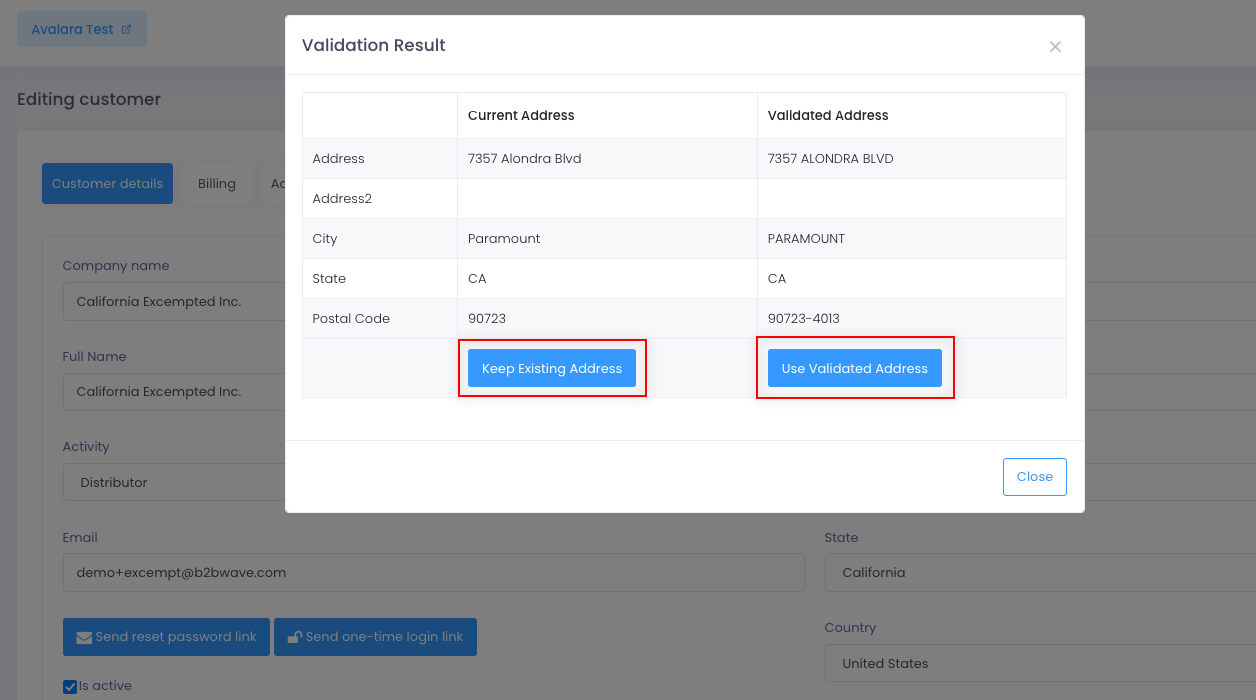
While viewing a customer, you can validate their address by clicking on the Validate address with Avalara button. The validation result will be saved, so you don't need to re-validate the address for future orders. Avalara can also provide suggestions that can make order delivery easier.
Account setup at Avalara
- Setup customer types and resale certificates
- Setup product types
- Setup state sales tax registration details
Avalara setup at B2B Wave
- Map B2B Wave fields to Avalara fields (product tax code, customer code, entity use code)
- Set default values for item tax codes and shipping items
- Generate API keys for the B2B Wave integration and test the connection
View our detailed setup page here.

It shouldn’t take 5 hours, 9 emails, and 12 files to do simple tasks.
B2B Wave’s integrations make all operations from order processing to payment collection smoother. Keep all your data in one window, at all times.
.svg)

.png)

.svg)