.png)
.png)
What a B2B Ordering Workflow Looks Like in a Wholesale eCommerce Platform


Key Takeaways
- Many wholesalers digitize their ordering process without considering how their existing workflow fits into a B2B eCommerce platform.
- A good wholesale ordering workflow takes into account three roles: customers, sales reps, and admins.
- Buyers need a simple, personalized B2B portal where they can instantly see their favorite products, right prices, order history, and order updates.
- Sales reps need a sales rep portal and app that helps them support new and existing accounts effectively.
- Before launching the portal, admins should organize products, pricing, shipping rules, payment methods, and key integrations so the platform can automate standard processes rather than exposing operational gaps.
Do we really need a B2B eCommerce platform?
It’s the question nobody utters out loud in that team meeting, but everyone’s secretly thinking.
The data isn’t exactly reassuring. Distribution Strategy Group’s 2023 report revealed that only 40% of distributors were at least somewhat satisfied with their eCommerce investment, and 34% were slightly or not at all satisfied. This means that many are struggling to make their online ordering channel actually work for them.
So, many wholesalers end up in a liminal space, with processes too fragmented to move online cleanly and too manual to automate as-is.
A classic case of: trusting the tech, but not the process.
When you take a B2B ordering workflow that’s all over the place and move it online without redesigning it, you don’t get digital transformation. You get a pixelated mess with the same bottlenecks, just in a new interface.
The businesses that get the most out of a B2B eCommerce platform aren’t necessarily the most tech-savvy ones. They’re the ones that map their ordering workflow clearly before touching a single setting.
What’s a B2B Ordering Workflow?
A B2B ordering workflow is the end-to-end process that wholesalers, buyers, sales reps, and operations teams follow to move an order from initial buying intent through fulfillment and delivery.
In daily wholesale life, it usually entails: a customer logs into a B2B ordering portal, like B2B Wave, and sees their favorite items, recommended products, negotiated pricing, and offers. When they’re ready, they order. From there, the order appears in your team’s queue: the operations team prepares it, while the sales team monitors its progress in case the customer needs help. Finally, the buyer receives all necessary updates until it’s out of the door, like the invoice, tracking information, and shipping confirmation.
In a properly set-up B2B eCommerce platform, every step matches the right role and is automated, where possible, to reduce errors, manual entry, and redundant emails. For instance, this could mean automatically generating an invoice when an order comes in, or splitting an order into available and backordered items so fulfillment moves without delays.
Why Most Businesses Get It Backward
Here’s where many wholesalers get it wrong: they start with the technology, without updating their methods.
They jump straight into importing products and inviting customers, expecting the platform to (magically) fill in the gaps in their processes. The truth is that, if these are unclear, outdated, or still full of manual exceptions, the software has very little to automate. It’s like throwing warm spaghetti on ice. It may stick momentarily. Eventually, it will slip off.
Our support and sales teams have seen this happen time and time again. Titanic-like launches usually have a few things in common:
- Lack of onboarding. Customers log in and don’t know what to do.
- Manual processes that persist. Sales reps are still working manually because the portal “isn’t fully ready yet.”
- Exceptions that turn into the new normal. Admin teams get buried in exceptions because they haven’t set up product data, pricing, and shipping rules from the start.
When implementation goes awry, the problem isn’t always the B2B eCommerce platform itself. Before going live, wholesalers need to define how their customers, sales team, order management processes, and other tools all fit together, and understand what their chosen platform can and cannot support.
Configuration order matters. The workflow must come first, so the platform can follow it. Skip this, and the tech will feel broken too.
The Three-Lane B2B Ordering Workflow
A good B2B ordering process is flexible enough to support the different ways wholesale orders actually happen.
Wholesale ordering is its own realm. A 2026 Gartner survey reveals that 67% of B2B buyers prefer a rep-free experience, but others still need assistance. In the back office, every order must move cleanly through inventory, accounting, fulfillment, and customer communication.
A strong B2B ordering workflow comprises three interconnected paths: the customer ordering lane, the sales reps lane, and the admins lane.
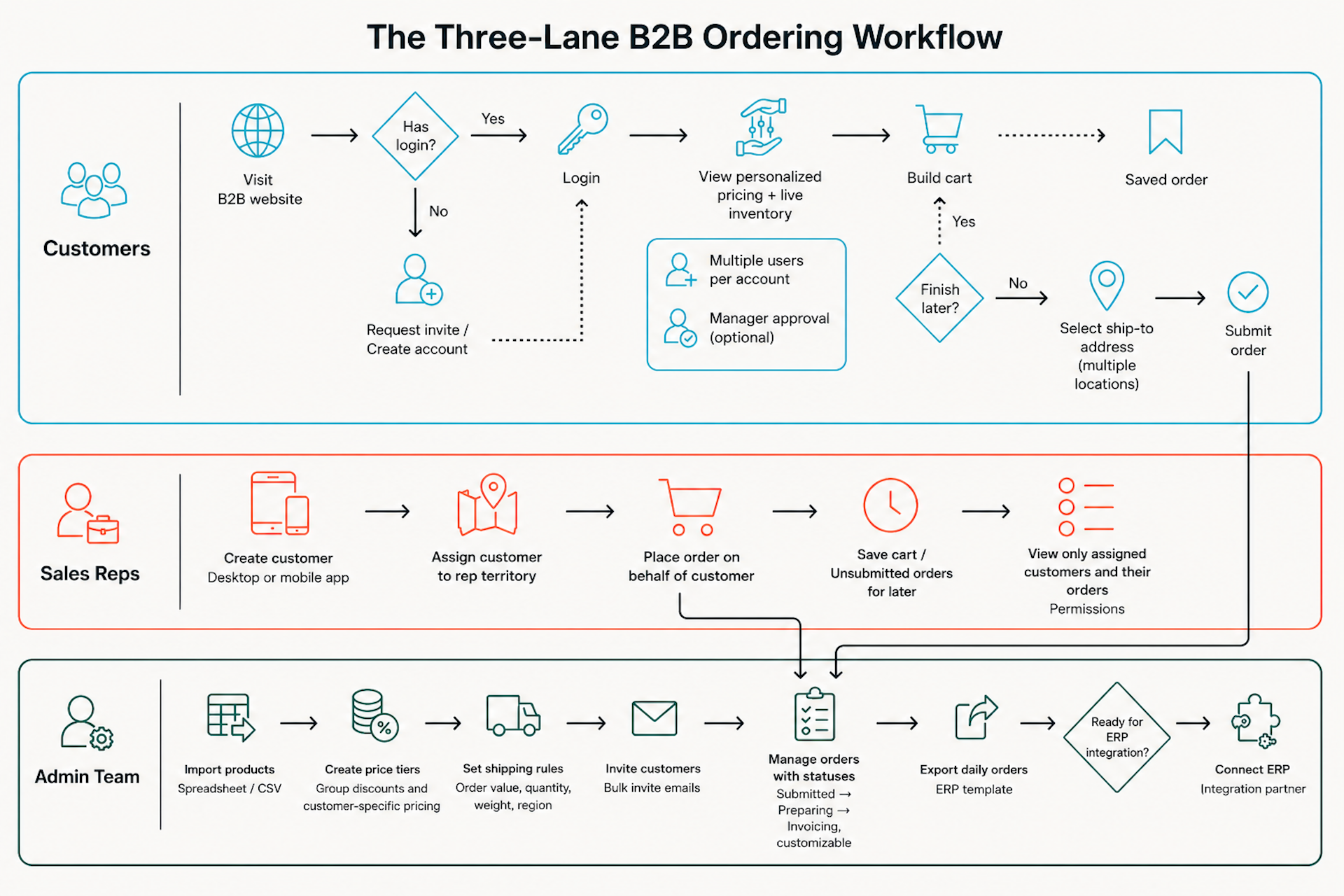
Lane 1: What Customers Want From Your B2B Website
Everything your buyer sees, does, and judges you by sits here.
Your customers compare your wholesale portal to every other online buying experience they’ve already had, even as consumers. If logging into your B2B portal feels harder than what they’re used to, you’ve already lost ground before they place their first order. So what does a smooth customer experience actually look like?
When They First Log In
A buyer lands on your portal and either logs in or requests access. If they’re new, they create an account and wait for approval. Your team still controls who gets in, but that approval process needs to be swift and transparent.
Once they log in to your wholesale website, they want to see a catalog curated just for them, including their favorite brands and products, true availability, personalized prices, and special offers.
All of this matters. A buyer who sees the wrong price or an unfiltered catalog may not call to clarify. They’ll lose confidence in the B2B portal and fall back to emailing your sales rep or switch to another supplier that offers a better online experience. That’s the moment adoption (and sales) dies.
When They’re Ready to Order
Browsing, searching, and reordering from past purchases should feel fast and familiar. A great customer ordering lane should give buyers live inventory visibility, so they know what they can actually order; saved orders, so they can build their cart over time without pivoting at the last minute; and quick reordering, so repeat purchases are effortless. It should also support multiple user roles and manager approvals to avoid internal delays. At checkout, buyers should be able to pick the right ship-to address, payment method, and delivery date, if applicable.
Before East Coast Tropicals, a tropical plant wholesaler, went fully digital, orders came in via phone calls, emails, and a simple online form. Today, 90% of their customers place orders online themselves. As Scott Mickulin, Head of Sales & Operations, puts it: “Customers liked just the fact that they were able to place an order on there and saw either what we had in stock or what they could source.”
After They Submit an Order
Breaking news: customer experience doesn’t end at “Order Submitted”. It ends at delivery.
Buyers feel confident when: they get an automatic order confirmation, can track order status without flooding your team’s inbox, and can message you directly from the order page if they need help. And finally, receiving the tracking number and estimated delivery date once it ships. Make these easy, and this lane becomes the royal road to repeat business and loyalty.
Why This Lane Matters
Remember: Your buyers can only experience what your admin team has set up for them. But first, a word about your sales reps.
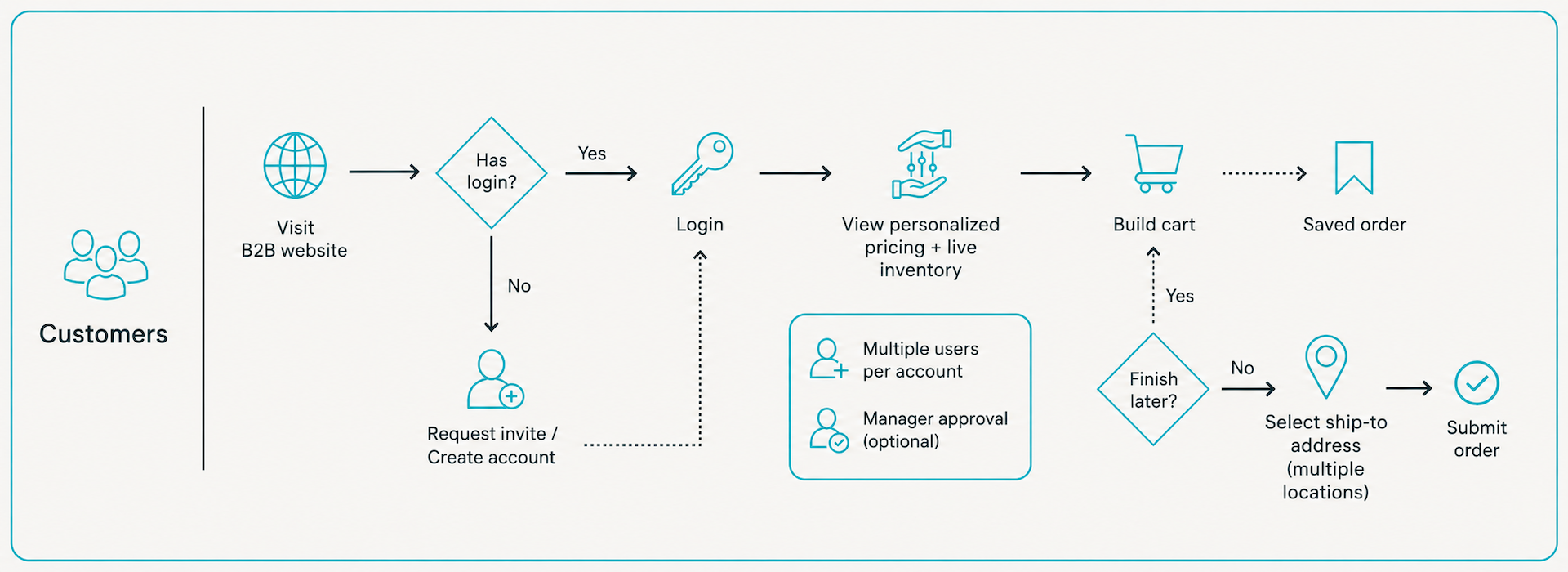
Lane 2: What Your Sales Reps Need
This is the part most wholesale businesses forget, and one of the biggest reasons rep adoption fails.
The website may work fine. But, because nobody set it up with sales reps in mind, they never had a reason to trust it. So they keep taking orders manually two months after launch, and blame it on the B2B eCommerce portal.
Everyone talks about the buyer experience. Almost nobody talks about the rep experience. And in wholesale, that’s a major blind spot.
What Sales Reps Actually Need in a Wholesale Ordering Workflow
Your sales reps are not mere order-takers. They’re the connective tissue between your business and your buyers. They need an online process that supports their role. Let’s break it down:
- Account creation. A rep closes a new customer and creates the account directly from their mobile app or desktop. The customer is automatically assigned to them, so the rep sees only their own accounts and related orders.
- Assisted Ordering. Sometimes buyers need extra support. Maybe they’re old-school or need help with a complex order or info about a new product. Your rep places it directly on the platform on their behalf. The order follows the same flow as a self-serve order, without falling back on the “old” phone-and-spreadsheet way.
- Saved orders. A rep can prepare an order during a customer call and save it for the buyer to review and submit later. A small feature ushering in a big shift: skeptical buyers can start using your B2B ordering portal without feeling like the personal relationship has disappeared.
Permissions Are the New Black
Reps should only see the customers assigned to them: their accounts, orders, and reports. They shouldn’t access your full client list or their colleagues’ pipelines.
This is about honoring territory rules and commercial agreements that may include exclusivity clauses. Most of all, it’s about data hygiene and focus.
A rep who logs in and sees 1,000 irrelevant accounts gets noise. A rep who logs in and sees their own customers and orders gets a workflow they can actually use, one that makes them think about growth. Do they need to create special promos to re-engage buyers or reward their loyalty? Is there a new drop a customer needs to know about?
A sales rep portal, with the right permissions, can determine whether your team adopts the platform and how it performs.
Why This Lane Matters
Salesforce research found that most reps spend only 28% of their time actually selling, with most of their time consumed by tasks like data entry.
A great platform experience for your sales reps levels up your digital wholesale game. They stop being order-entry clerks and start being what they’re supposed to be: the relationship layer on top of a system that handles the repetitive and the mundane. That’s where the real account growth happens.
But behind every productive sales rep is the team that makes the whole system work: your admins.
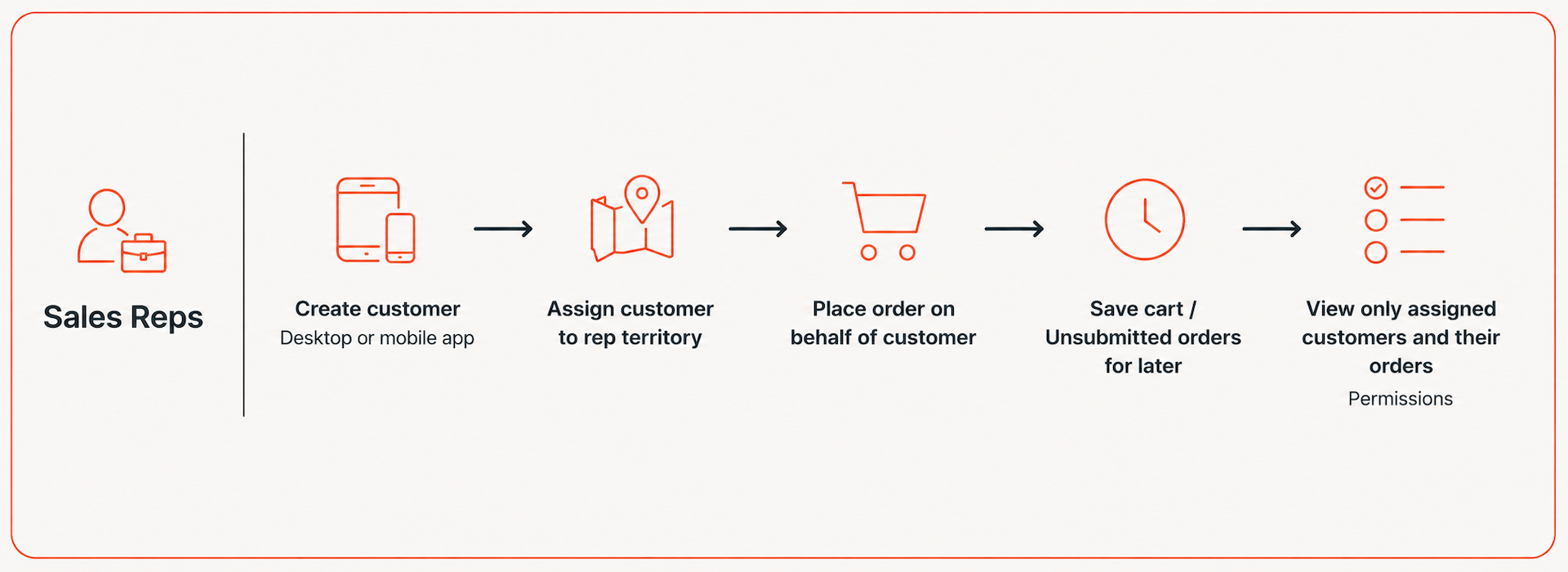
Lane 3: What Your Admin Team Builds (And Why It Comes First)
Every personalized catalog a customer sees, every product your sales rep pitches to a buyer, every shipping option at checkout originates here.
Think First, Upload Later
Before anything else, your products need to be in the system. But this step deserves more thought than most wholesalers give it.
Ella B. Candles, a custom candle wholesaler, experienced this firsthand, managing over 10,000 products. Their catalog challenge is more common than you’d think: thousands of products sharing the same base SKUs but with highly personalized variants, like bow colors and scents. The first instinct was to import everything as separate products. The smart move was to organize the entire catalog around configurable products with clear variant options. The new structure also led to their Build-A-Candle functionality, which allows buyers to create their own candles easily and error-free.
The lesson applies whether you have 50 or 10,000 SKUs. If you sell a base product with multiple variants, ask first: Should it live as an endless list of individual products, or as one parent product with clear options? The decision shapes order management, inventory accuracy, and buyer experience.
Next Up: Configure Product Pricing and Visibility
Wholesale pricing is like a Sudoku puzzle: a matrix of customer groups, volume thresholds, negotiated rates, and special terms. Getting this right before a single customer logs in is essential.
Hatch Coffee manages diverse price lists and product visibility across distributors and wholesalers, some ordering only coffee, others only oat milk, and others operating outside the Greater Toronto Area. Their team set up privacy controls in B2B Wave, grouping customers so each could see the right prices, products, and shipping costs. It eliminated manual intervention for every order.
Final Call: Set Up In The Right Order, Then Go Live
Invite customers only when products, pricing, order history, open orders, payment methods, and shipping rules are fully set up, not earlier. Ensure your order statuses support your fulfillment process and give customers true visibility.
As for accounting tools like Xero or QuickBooks, test the connection early, especially if you rely on them for taxes and invoicing. If your inventory system is your go-to source for product data or stock levels, test it out too. Export daily orders and upload them to your ERP to check data integrity before fully integrating.
Later, the workflow is stable, connect your ERP system for live syncing. Pushing unstable data into clean systems is harder to fix than it seems.
Why This Lane Matters Most
The admin lane needs thinking and planning. Get it right, and the other two lanes feel like an open freeway. Rush through it, and the whole thing starts to unravel.
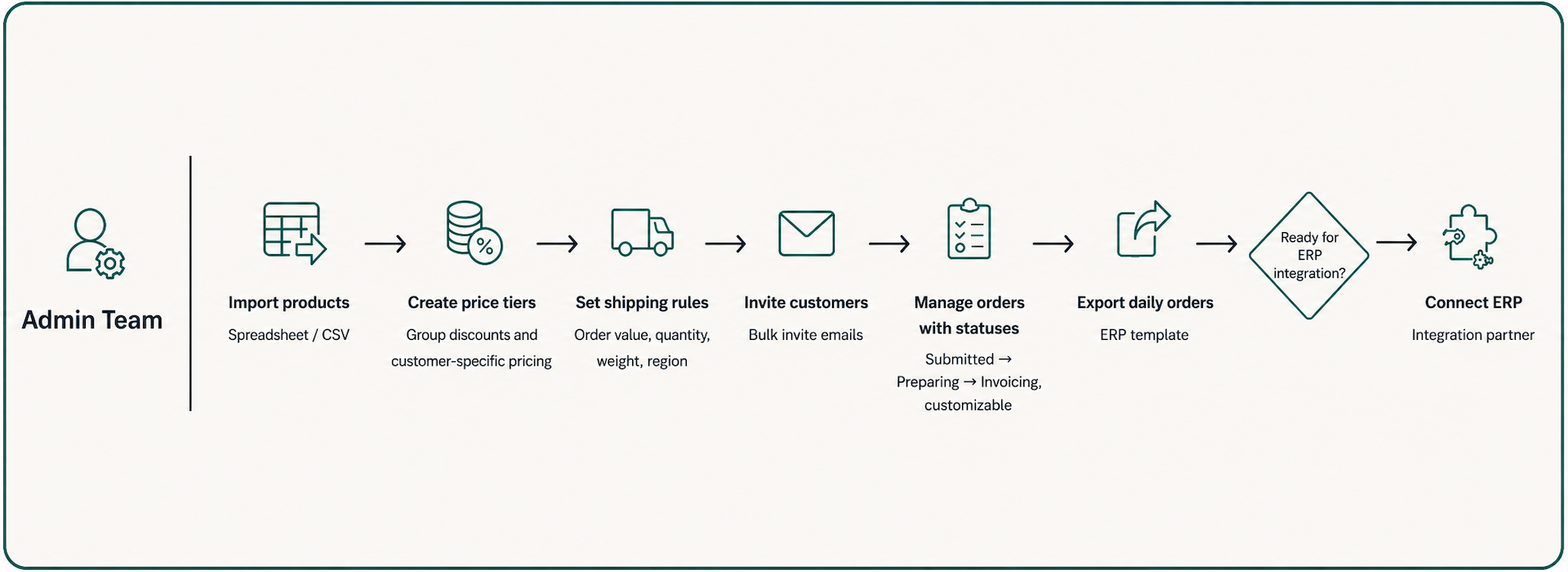
Final Words
The businesses that scale successfully aren’t always the ones with the most sophisticated setup on day one. They’re the ones that get their workflow right first across all essential team roles (customers, sales reps, and admins), then let the B2B platform deliver on their investment. At the end of the day, the tech is the easy part. The workflow is the real work.




.svg)

Join fast-growing B2B wholesalers, distributors, and brands who are automating their businesses.
No one does B2B eCommerce like B2B Wave. We’re fast, intuitive, error-free, and integrate with your current stack.
.svg)

.png)

.svg)